
What’s the difference between moving my website and moving my domain?
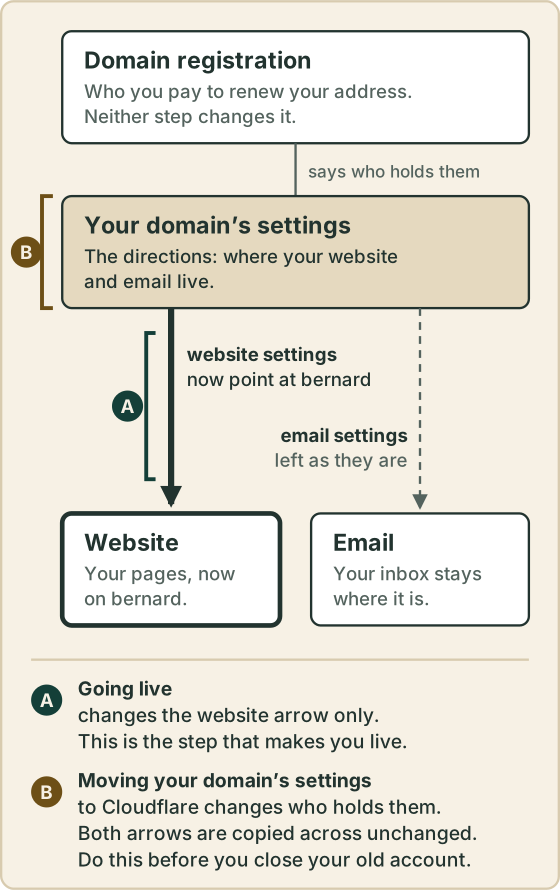
Going live changes where your website is. Moving your domain’s settings to Cloudflare changes who holds those settings. You only need the first to be live. Neither touches your email.
The prompt
“My site is live on bernard at [yourbusiness.com]. I want to close my old [Squarespace / Wix / WordPress host] account one day. Tell me in plain English what has to happen first, and whether my domain’s settings should move to Cloudflare. Change nothing yet.”
Signed in, Get my prompt fills in your site for you. Otherwise press Copy and fill in the [bracketed] parts. First time? Connect your AI to bernard once: Use your own AI (opens in a new tab).
Why Cloudflare matters when you want to close your old account
Your old provider still holds your domain’s directions: the settings that say where your website and email live. While it holds them, closing that account would take your address with it.
Moving those settings to your own Cloudflare account, connected to bernard, is what sets you free. After that, Bernard can check them and, with your approval, add to them for you. Here is the full route, with its checks.
The order
- Check your new site. Visit both addresses, with and without the www, and send yourself a message through your contact form.
- Check your email. Send an email from your business address, and have someone send you one.
- Move your domain’s settings to Cloudflare. Bernard can then hold them for you.
- Then cancel your old website plan. Keep the domain and any email subscription until those have moved too.
Leaving Squarespace? The safe order, and the two things never to cancel, are in Leave Squarespace without breaking my domain or email.
The detail, if you want it
Your address, your website and your email feel like one thing because they often arrive on one bill. They are three separate things:
- Your domain registration. Who you pay each year to keep your address,
like
yourbusiness.com. - Your website. The pages people see when they type your address.
- Your email. Addresses like
[email protected], and the mailboxes behind them, often run by Google or Microsoft.
Neither step moves your mailboxes. Neither moves your registration either, unless you also choose to transfer it, which is a separate job: Move my domain registration to Cloudflare.
Questions people ask
- Do I have to move my domain’s settings to Cloudflare to go live?
- No. You’re live the moment your address shows your new site. Moving the settings comes later, before you close your old account.
- Will moving my domain’s settings to Cloudflare move my email?
- No. Your mailboxes stay with your email provider. The settings for your email are copied across exactly as they are, and Bernard checks your email still works before anything switches.
- Is moving my domain’s settings the same as transferring my domain?
- No. Transferring changes who you pay to renew your address. Moving the settings changes who holds them. You can do one without the other.
- Can Bernard change my domain’s settings without asking?
- No. Once they’re in your own Cloudflare account and connected to bernard, Bernard asks for your approval before he adds anything. The switch itself is a change you make at your domain company. He never owns your domain.